

Human in the Loop: How to Keep People in Control of AI Workflows
Key Takeaways+
- HITL means the workflow stops until a person approves, edits or rejects the AI's output.
- Human on the loop is lighter: the AI acts on its own while a person monitors and can step in.
- Use a human checkpoint when an action is hard to reverse, faces customers, moves money or falls under a regulation.
- Zapier and n8n both have built-in approval steps that pause a workflow until someone responds.
- A KPMG and University of Melbourne study found 66% of people rely on AI output without checking its accuracy.
- The EU AI Act names "automation bias" as a risk that people overseeing high-risk AI must stay aware of.
Human in the loop (HITL) means an AI workflow pauses at set points so a person can approve, edit or reject the AI's output before anything happens. The AI does the reading, sorting and drafting. A person makes the call on anything that's costly, public or hard to undo. That keeps the speed of AI without handing it decisions it can't own.
At Dscvred Studio, we build AI automation for finance, healthcare and B2B SaaS teams. Every workflow we hand over has a named person checking what matters. This guide covers when you need HITL, real examples and how to set it up in Zapier and n8n.
What Does Human in the Loop Mean?
Human in the loop is a way of designing AI systems so a person reviews, corrects or approves the AI's work at defined points. In machine learning, it often means people labelling data and giving feedback during training. In AI workflows, it means a person signs off before the workflow takes an action.
Another common term is human oversight, which is the phrase the EU AI Act uses.
How human in the loop works
Most AI human-in-the-loop workflows follow the same four steps:
- AI step: the AI reads an input and drafts a reply, a decision or a proposed action.
- Pause: the workflow stops at a checkpoint, or when the AI's confidence falls below a set level.
- Human review: a person approves, edits or rejects the proposal.
- Resume: the workflow carries on with the approved version, and any correction can feed back into the prompt or rules.
The pause is the important part. Without it, a person only sees the result after it has already reached the customer.
Human in the Loop vs Human on the Loop
The difference is when the person steps in. In the loop, they approve before the action. On the loop, they watch the AI act and step in when something looks wrong.
Most real workflows mix these. A lead workflow might run fully automated data entry, then pause for a person before the first reply goes out.
Is human in the loop agentic AI?
No, but it's the main control for agentic AI. An AI agent chooses its own steps and tools. A human checkpoint limits which of those steps it can take alone. For example, n8n lets you require approval before an AI agent uses a specific tool, such as sending a message or deleting a record.
When Does an AI Workflow Need a Human?
An AI workflow needs a human checkpoint when a wrong output would be hard to undo, visible to customers or covered by a rule. A simple test: if the AI is wrong, how hard is it to fix?
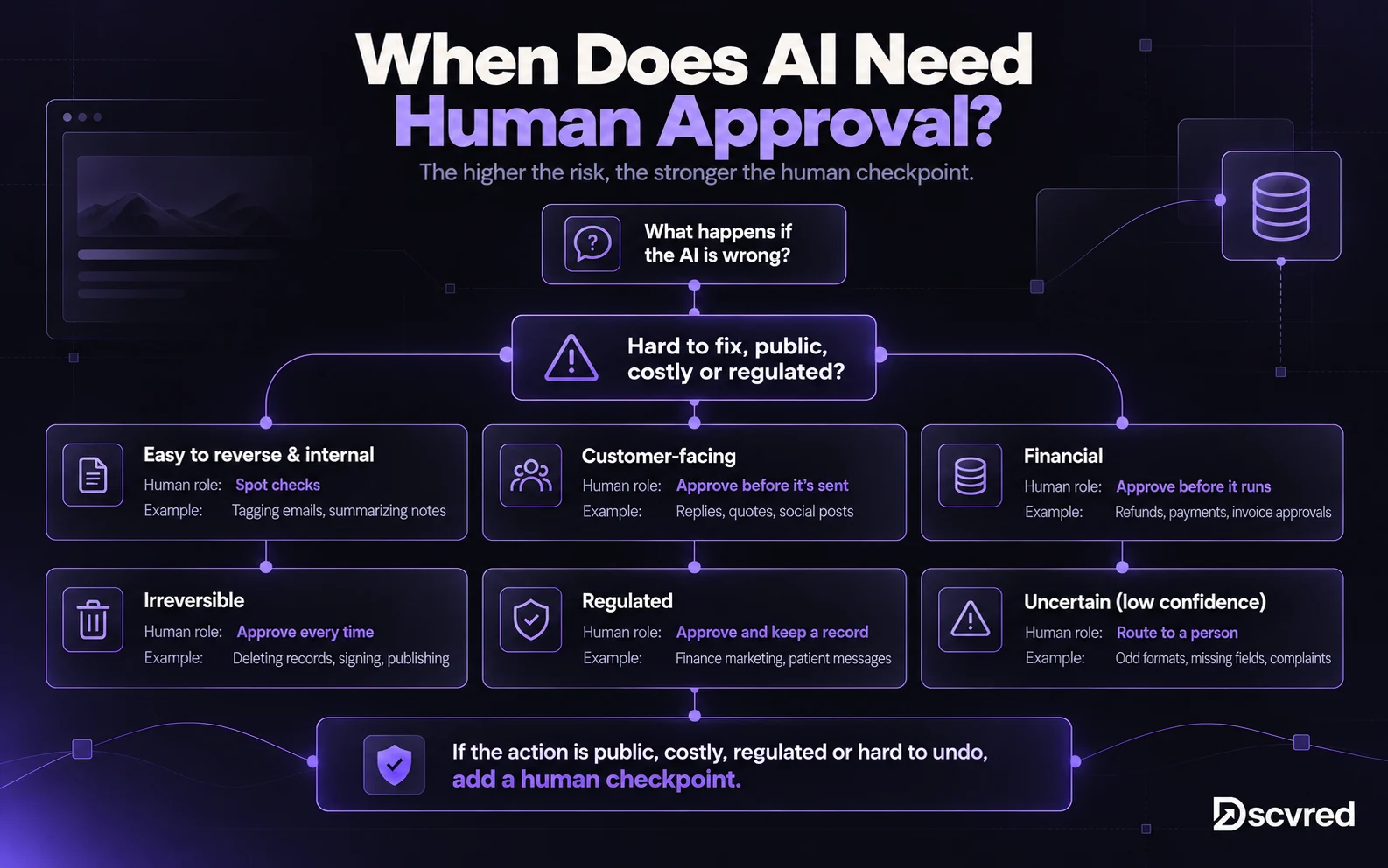
Start with more checkpoints than you think you need. Remove them only after the AI has proven reliable on your real work.
Human in the Loop Examples for Business
Good HITL design puts one check at the point of risk. Each example below is a common starter workflow from our AI workflow automation guide, with the person placed where a mistake would cost most.
How to Add Human in the Loop to an AI Workflow
You add HITL by placing an approval step between the AI step and the action. Here's the order we follow.
1. List the decisions
Write down every action the workflow takes. Mark each one as automatic, needs approval or never allowed. Keep the "never allowed" list short and firm, such as deleting data or sending bulk emails.
2. Set the checkpoint and the trigger for review
Decide whether every item pauses or only some. Common triggers are low AI confidence, a money amount over a limit, missing fields or certain keywords like "refund" or "cancel".
3. Put the review where your team already works
Send approval requests to Slack, Microsoft Teams or email. Show the AI's draft and the source data side by side. A reviewer should be able to approve, edit or reject in one step.
4. Name one owner per checkpoint
"Someone will check" usually means nobody checks. Give each checkpoint one owner and a backup, plus a time limit for responses.
5. Log every decision
Record what the AI produced, what the person changed and why. That log is your audit trail and your best source for improving prompts.
6. Reduce checkpoints slowly
Review override rates monthly. If people approve 99 out of 100 drafts unchanged for a month, consider moving that step to spot checks.
HITL in Zapier and n8n
Both tools have built-in approval steps:
- Zapier: the Human in the Loop tool can pause a Zap to request approval or collect more data before it continues. Zapier lists it on its Professional, Team and Enterprise plans.
- n8n: you can require human review before an AI agent uses a tool. Requests go to Slack, Teams, Gmail, Telegram or n8n Chat, and the reviewer approves or denies.
Checked on each tool's own documentation in October 2026.
How to Stop Reviews Becoming Rubber Stamps
A human checkpoint only works if the person reviews. When reviewers trust the AI too much, they approve without reading, and the check becomes a formality.
The risk is real. The KPMG and University of Melbourne global study surveyed 48,000 people across 47 countries. 66% said they rely on AI output without evaluating its accuracy, and 56% said they've made mistakes at work because of AI. McKinsey's 2025 State of AI survey found only 27% of organizations using gen AI review all of its output before use.
The EU AI Act calls this automation bias. Article 14 says people overseeing high-risk AI systems must stay aware of the urge to over-rely on its output. They must also be able to override the output and stop the system.
Ways to keep reviews honest:
- Show the source next to the AI's draft, so the reviewer can check it quickly.
- Highlight what matters, such as amounts, names and promises.
- Keep volumes reasonable. Fifty approvals an hour invites clicking "approve" without reading.
- Plant test cases now and then to see whether reviewers catch errors.
- Track overrides. A reviewer who never changes anything may not be reviewing.
What If the AI Gets It Wrong?
You catch it at the checkpoint, or you fix it fast. The business is still responsible for the outcome, so plan the correction path before launch.
- Stop the action: pause the workflow, hold the message or reverse the transaction.
- Fix the impact: the checkpoint owner corrects the record or contacts the customer.
- Record it: save the AI's output, what went wrong and the fix.
- Change the workflow: update the prompt, rule or threshold so it doesn't repeat.
For finance and healthcare teams, keep client and patient data out of AI tools that aren't approved for it. See how we approach this for financial services and healthcare teams.
How Dscvred Studio Can Help
We build AI automation with human review where judgment matters. Anything important gets a human check, an alert or a manual fallback, and we hand over a documented workflow with a named owner. Explore our AI automation services, or book an intro call to map the checkpoints for your first workflow.
FAQ
What is another term for human in the loop?
Human oversight is the most common alternative, and it's the term the EU AI Act uses. You'll also see HITL, human review and human-in-the-loop AI.
Is human in the loop the same as human on the loop?
No. In the loop, the workflow waits for a person to approve. On the loop, the AI acts on its own while a person monitors and can step in.
Does every AI workflow need a human checkpoint?
No. Low-risk, easy-to-reverse tasks like tagging emails can run on spot checks. Add an approval step for customer-facing, financial, irreversible or regulated actions.
What is human in the loop in machine learning?
It means people label data, correct outputs and give feedback while a model is trained or tuned. Reinforcement learning from human feedback (RLHF) is one well-known example.
What if the AI gets it wrong?
Good workflows catch it before it matters. Low-confidence results go to a person, customer-facing actions need approval, and every decision is logged so the error can be fixed and prevented.