Webflow Cost Breakdown: 10 Factors That Set Your Price
Key Takeaways+
- Webflow cost has three parts: Platform fees paid to Webflow, a one-time build fee and ongoing support.
- Most sites need a $15 or $25 a month site plan, billed yearly. Paying monthly costs 56% to 67% more.
- Team size, extra bandwidth and add-ons like Localize or Optimize raise the monthly bill.
- The build fee is where quotes differ most. Unique templates, CMS structure, integrations and approvals drive it.
- Ready content and brand assets are the easiest way to lower a quote.
- Webflow's May 2026 plan changes reach Freelancer and Agency Workspaces and legacy-priced sites from November 16, 2026.
Two Webflow quotes for what looks like the same website can be thousands of dollars apart. The Webflow price itself is rarely the reason. It's the choices hidden inside the quote: How many page templates you need, how complex the CMS is, what you connect it to and who has to approve it.
This guide breaks down the 10 factors that set your price, with a lower-cost and higher-cost version of each. If you just want the price ranges, our guide to Webflow website cost has them. Here, we explain what moves your number up or down.
How Webflow Cost Works
Webflow cost has three buckets. You pay Webflow a recurring fee for the site plan, workspace seats and add-ons. You pay a freelancer or agency a one-time fee to design and build the site. Then you pay for ongoing support, a domain and business email.
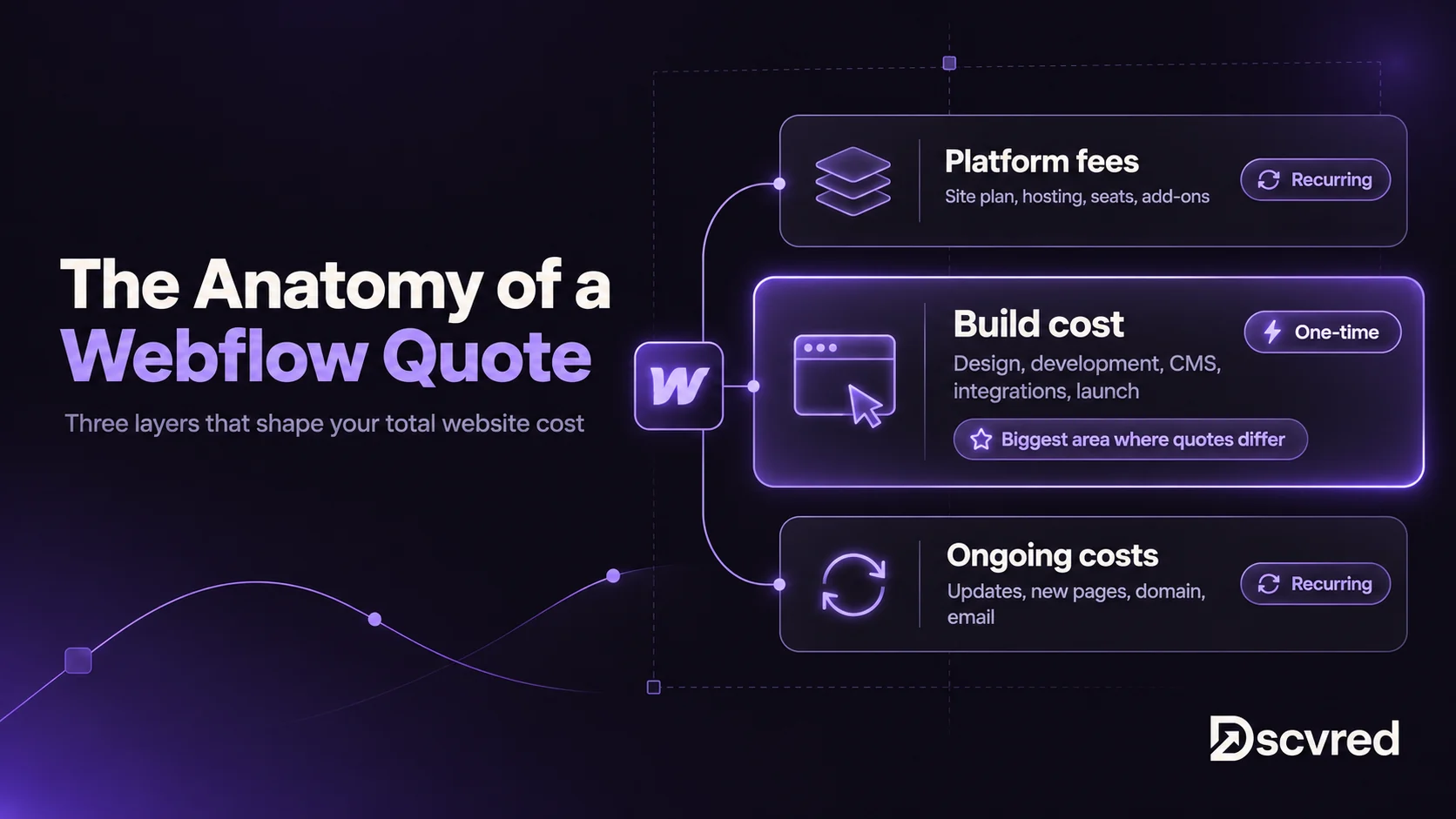
Platform fees are easy to predict. The build cost is where two quotes split apart, so that's where most of this guide focuses.
Platform Factors That Change Your Webflow Hosting Cost
Webflow hosting is included in the site plan, so you don't pay for hosting separately. Your monthly Webflow cost depends on five things. All prices below come from Webflow's pricing page, checked November 2, 2026.
Factor 1: Your site plan
The site plan sets your base Webflow hosting cost. The main question is whether you need a CMS.
- Lower cost: Basic at $15 a month, billed yearly. It covers up to 300 static pages and 10 GB of bandwidth, with no CMS. It suits a simple brochure site.
- Higher cost: Premium at $25 a month, billed yearly. It adds a CMS with 20,000 items and 40 Collections, plus 50 GB of bandwidth. Most marketing sites with a blog need it.
- Online stores: Ecommerce plans cost $29, $74 or $212 a month, billed yearly. The $29 Standard plan adds a 2% transaction fee.
- Large teams: The Team plan costs $2,500 a month on an annual contract, with page branching and publishing workflows.
In May 2026, Webflow merged its old CMS and Business plans into Premium. If a quote still lists a $23 CMS plan or a $39 Business plan, it's out of date.
Factor 2: Billing cycle
Paying yearly is the simplest saving.
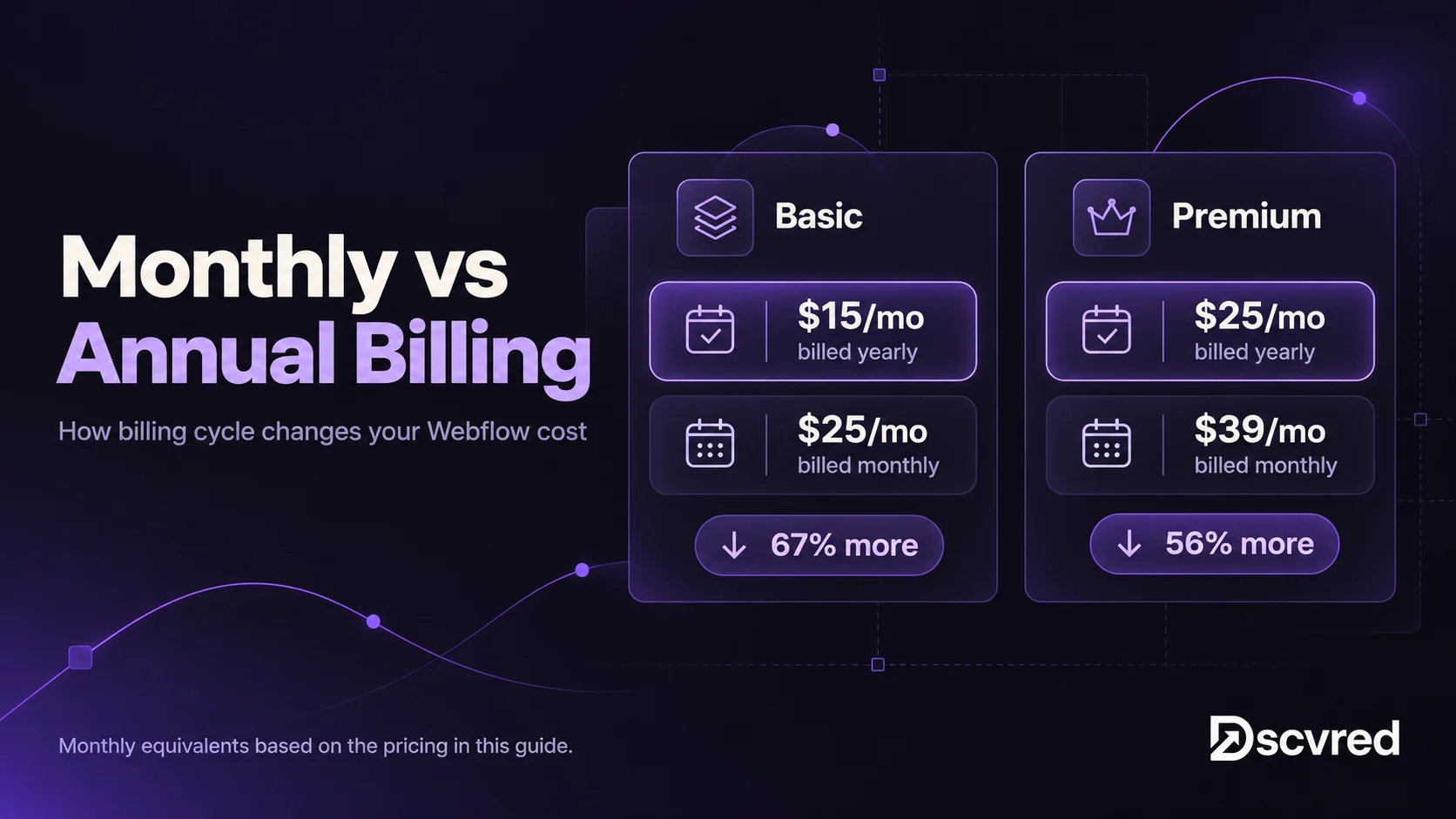
Monthly billing only makes sense if you expect to change plans within the year.
Factor 3: Traffic and bandwidth
Premium includes 50 GB of bandwidth a month. That's enough for most B2B sites. High-traffic sites, or sites with heavy video and image files, may need more.
- Lower cost: Stay within 50 GB by compressing images and hosting video on YouTube or Vimeo.
- Higher cost: Bandwidth add-ons start at +50 GB for $20 a month, billed yearly. The largest add-on is +2.45 TB for $974 a month.
Factor 4: Seats and team size
Your team also needs a Workspace plan. Each Workspace includes one full seat.
- Lower cost: One person edits the site. A Core Workspace at $19 a month covers it.
- Higher cost: A marketing team that designs and publishes. Extra full seats cost $39 a month each, and limited seats for content editors cost $15. Reviewers and commenters are free.
Freelancers and agencies use separate Workspace plans, at $16 and $35 a month. These sit with whoever builds the site, not with you.
Factor 5: Add-ons
Add-ons are where monthly bills grow quietly.
- Localize for translated sites: $9 a month for 1 to 3 locales, or $29 for up to 10.
- Analyze for site analytics: From $9 a month.
- Optimize for A/B testing and personalization: From $299 a month.
- AI credits: Every Workspace includes some, and extra packs cost $20 a month for 2,000 credits, billed yearly.
Only add these when a clear need appears. Many sites launch without any.
Build Factors That Drive Webflow Development Cost
The build is the biggest part of most budgets and the part that varies most between quotes. Each factor below shows what pushes it up or down.
Factor 6: Unique templates, not page count
Page count is a poor guide to cost. What matters is how many unique page designs you need. Twenty blog posts share one template, so they cost about the same to build as one.
- Lower cost: 5 to 10 pages built from 2 or 3 templates.
- Higher cost: 25 or more pages where most need their own layout.
Impact: High. Each unique template needs its own design, build and testing on every screen size.
Factor 7: Design approach
- Lower cost: A template from the Webflow Marketplace, adjusted to your brand. Many templates are free, and paid ones are a one-time fee.
- Higher cost: A custom design system built from scratch, especially if you need a new brand too.
Impact: High. Custom design costs more upfront but makes every future page faster to add. Our website design services cover both approaches.
Factor 8: CMS structure
- Lower cost: One blog Collection with standard fields.
- Higher cost: Several linked Collections, such as case studies tied to industries and team members, with filters and multi-reference fields.
Impact: Medium to high. Linked Collections take longer to plan, build and test. They also make the site easier to manage later.
Factor 9: Interactions and integrations
- Lower cost: Simple hover effects and Webflow's native forms.
- Higher cost: Scroll animations, Lottie files, custom code components, and forms connected to HubSpot, Salesforce or Zapier.
Impact: Medium. Budget each CRM integration as its own line item. Field mapping, tracking and testing take real time, and they're easy to leave out of a quote.
Factor 10: Content, migration and approvals
- Lower cost: Content is written and approved before the build, and one person signs off.
- Higher cost: The agency writes or migrates content, sets up 301 redirects and works through legal, compliance and accessibility reviews.
Impact: Medium to high. Moving from another platform adds content migration, redirects and SEO checks. Our WordPress to Webflow migration guide covers what that involves. For finance and healthcare firms, compliance review rounds and WCAG accessibility testing add time to every phase.
Who builds the site also changes the price. A freelancer, a small studio and a larger agency charge different rates for the same scope. The factors above decide how much work there is. The provider decides the rate.
Ongoing Webflow Costs After Launch
After launch, you'll pay for:
- Your site plan and seats, as covered above.
- A domain, bought from a registrar such as Cloudflare or Namecheap. Webflow doesn't sell domains.
- Business email through Google Workspace or Microsoft 365. Webflow doesn't include email.
- Support or a maintenance retainer for content updates, new pages, fixes and checks.
- Plan upgrades as traffic, CMS items or your team grows.
Webflow handles hosting, security and SSL, so there are no plugin updates to pay for.
Webflow Cost Breakdown: 3 Sample Budgets
These examples answer the questions most people ask first: What kind of site, how many pages and who builds it. Platform costs use Webflow's yearly prices. Build ranges use the same bands as our Webflow website cost guide.
Small business site (5 to 8 pages, freelancer)
- Plan: Basic, $15 a month ($180 a year). Choose Premium at $25 if you need a blog.
- Design: An adjusted template.
- Features: Native forms, no integrations.
- Build: A freelancer, typically about $1,500 to $10,000.
B2B marketing site (15 to 25 pages, agency)
- Plan: Premium at $25, a Core Workspace at $19 and one limited editor seat at $15. That's $59 a month, or $708 a year.
- Design: A custom design with 6 to 8 templates.
- Features: 2 or 3 CMS Collections, HubSpot forms and analytics.
- Build: An agency, about $15,000 to $50,000 for a custom site.
Regulated or content-heavy site (40+ pages, agency)
- Plan: Premium at $25, a Growth Workspace at $49, two extra full seats at $78, Localize at $9 and a +50 GB bandwidth add-on at $20. That's $181 a month, or $2,172 a year. Larger teams may need the Team plan.
- Design: A full design system.
- Features: Linked Collections, migration with redirects, accessibility testing and compliance approvals.
- Build: An agency, from $15,000 to $50,000, and more for enterprise-scale sites.
How to Lower Your Webflow Cost Without Cutting Quality
- Prepare content and brand assets before kickoff. Waiting on copy and logos is one of the most common causes of delays and extra fees.
- Reuse templates. Design fewer unique layouts and build more pages from them.
- Start with one CMS Collection. Add linked Collections once you know you need them.
- Pay yearly and choose the right plan at launch.
- Agree on one approver and a fixed number of revision rounds.
How Dscvred Studio Can Help
The quote you sign should match the bill you pay. As a Certified Webflow Partner, we scope every project before we price it, so you see each of these 10 factors as a line in your quote, not as a change request later.
You'll know your build fee, your monthly Webflow costs and what's included before work starts. Migration, 301 redirects and editor training are part of every project, and most sites go live in 4 to 6 weeks. Explore our Webflow development services, or book an intro call and we'll show you where your budget goes.
FAQ
How much does Webflow cost per month?
The platform costs $15 to $25 a month for most sites, billed yearly. That's Basic for simple sites and Premium for sites with a CMS. A Workspace plan for your team adds $19 to $49 a month.
Does Webflow include hosting?
Yes. Hosting, SSL and security updates come with every paid site plan. You don't need a separate hosting provider.
What makes a Webflow website expensive?
Many unique page templates, a custom design system, linked CMS Collections, CRM integrations and long approval processes. Content writing and migration add more.
Is Wix or Webflow cheaper?
Wix is often cheaper to start. Webflow often costs more to build but gives you more design control, a stronger CMS and clean code for SEO, which matters more as a site grows.
Is $1,500 a good price for a website?
It can be for a small, template-based site built by a freelancer with your content ready. It's rarely enough for a custom design, a CMS with several Collections or any integrations.
How much does Webflow maintenance cost?
It depends on how much work you need each month, such as content updates, new pages and checks. Ask any agency for a retainer that lists hours and tasks, so you can compare offers fairly.