

AI vs Automation: What's the Difference (and When You Need Each)
Key Takeaways+
- Automation runs fixed rules. It gives the same output for the same input, every time.
- AI infers its output from data. It handles messy input but can be wrong or give different answers to the same question.
- Rule-only systems are not AI. The EU AI Act guidelines exclude systems built only on rules people defined.
- Use automation for structured, repeatable steps where a mistake must never happen.
- Use AI for reading, sorting, summarizing and drafting, with a person checking anything that matters.
- The strongest setup combines them: rules route the work, AI reads it and people approve the risky steps.
Automation follows rules a person wrote. It does the same task the same way every time. AI learns patterns from data, so it can read messy input like emails, PDFs and free-text answers and make a judgment call. Use automation when the steps are fixed. Use AI when the input varies or the task needs judgment. Most real workflows use both.
At Dscvred Studio, we build AI automation for finance, healthcare and B2B SaaS teams. This guide explains the difference in plain terms, shows where machine learning fits, and gives you a simple test for picking the right one.
What's the Difference Between AI and Automation?
The core difference in AI vs automation is how each one decides what to do. Automation follows predefined rules: if this happens, do that. AI looks at the input and works out the most likely right answer, based on patterns it learned from data.
IBM puts it simply: rule-based automation is process-driven, while AI is data-driven.
A simple way to remember it: automation does what you told it. AI does what it thinks you meant.
Is automation considered AI?
No. Automation and AI are separate things, even though vendors often blur them. The European Commission's AI Act guidelines say an AI system must infer how to produce its outputs. Systems that run only on rules people defined are left out of that definition. A Zap that adds a form entry to your CRM is automation. A step that reads the message and tags its intent is AI.
Automation vs AI vs Machine Learning
Machine learning is the most common type of AI today. It's how a system learns patterns from data instead of following written rules. Most tools sit somewhere on this spectrum:
The first two are automation. The last three are AI. When people say "AI automation" or "intelligent automation," they usually mean a workflow that mixes both: rules move the data and AI handles the steps that need judgment.
When to Use Automation, AI or Both
Pick by the task, not the tool. Ask three questions about each step in your workflow:
- Is the input always in the same format? If yes, use automation.
- Does the step need reading, sorting or judgment? If yes, use AI.
- Would a wrong output be costly, public or hard to undo? If yes, add a person to approve it.
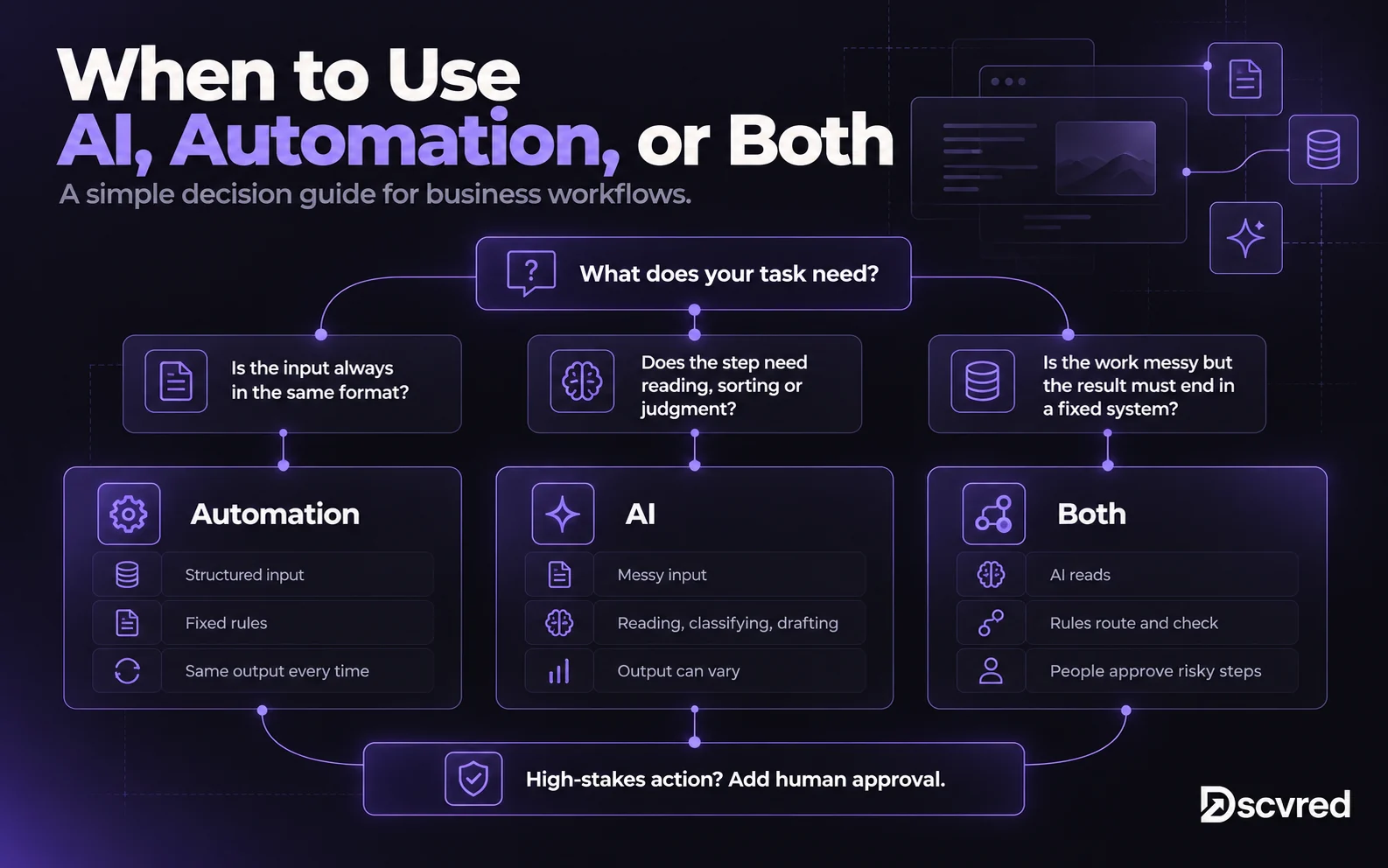
If you can write the rule in one sentence, you probably don't need AI for that step.
One Workflow, Built Three Ways
Here's the same task handled each way: new enquiries arrive through a website contact form, and each one needs to reach the right person.
Automation only. A rule reads the "Service" dropdown and sends the enquiry to the matching team. It's fast, cheap and never wrong about the dropdown. But when someone picks "Other" and writes a long message, the rule can't tell if it's a hot lead, a support issue or spam.
AI only. An AI model reads every message, decides what it is and replies. It handles "Other" well. But it might send a slightly different reply each time, invent a detail about your pricing or misfile a real lead as spam. Nobody sees it until a customer complains.
Both. Rules handle the dropdown, check for duplicates and create the CRM record. AI reads only the free-text message, tags its intent and drafts a reply. A person approves the reply before it goes out. You get the speed of AI where it helps and the reliability of rules everywhere else.
That third version is what we build most often. Our guide to AI workflow automation walks through how to plan and launch a workflow like this in 30 days.
AI vs Automation Examples
These are common business tasks and the approach that usually fits each one.
The Risks of Each
Both approaches fail. They just fail in different ways, so you plan for each differently.
Automation is brittle. It does exactly what the rule says, even when that's wrong. Rename a form field or change a tool and the workflow can stop or send data to the wrong place. The fix is simple: alerts on failure and an owner who checks them.
AI is unpredictable.Microsoft's Azure OpenAI documentation says that asking a model the same question several times will likely give different answers. It calls these responses "nondeterministic." AI can also state wrong facts with confidence. On one demanding benchmark in the Stanford 2026 AI Index, hallucination rates ranged from 22% to 94% across the models tested.
This shows up in business results too. McKinsey's State of AI 2025 found that 88% of organizations use AI in at least one function. Only 39% reported any impact on profit. Nearly a third of all respondents reported problems caused by AI inaccuracy.
The fix is to keep AI on steps where a person can check the output. Our human in the loop guide covers where to place those checks and how to stop them becoming rubber stamps.
For finance and healthcare teams
Use rules for anything that must be exact and auditable, such as fee calculations, eligibility checks and required wording. Use AI for reading and drafting, and keep client and patient data out of AI tools that aren't approved for it. We cover this in more detail for financial services and healthcare teams.
How AI and Automation Work Together
The best workflows aren't AI vs automation. They split the work: automation is the engine that moves data between tools, and AI is the reader that makes sense of what comes in.
A simple rule we follow: rules route, AI reads, people approve.
- Rules handle triggers, routing, data checks and anything that must be the same every time.
- AI handles the steps with messy input: classifying, extracting, summarizing and drafting.
- People approve anything customer-facing, financial or hard to undo.
AI agents push this further. An agent can choose its own steps and tools, so the rules and approvals around it matter even more. Start with fixed automation plus one or two AI steps, then add more freedom once the workflow has proven reliable.
How Dscvred Studio Can Help
We build AI automation that uses rules where they're reliable and AI only where it adds value. Every workflow gets a named owner, alerts on failure and human review where judgment matters. Explore our AI automation services, or book an intro call and we'll map which steps in your workflow need AI and which just need a rule.
FAQ
Is automation better than AI?
Neither is better in every case. Automation is better for fixed, repeatable steps because it's cheaper, faster and gives the same result every time. AI is better for messy input and judgment calls. Most teams get the best results by combining them.
Is automation possible without AI?
Yes. Most business automation runs with no AI at all. Sending receipts, syncing contacts, scheduling backups and routing form entries by field all run on simple rules in tools like Zapier, Make or n8n.
Is automation considered AI?
No. Automation follows rules people wrote, while AI infers its output from data. The EU AI Act guidelines exclude systems built only on human-defined rules from the definition of AI.
Can AI replace an automation engineer?
Not yet. AI can draft workflow logic and write code, but someone still needs to design the process, test edge cases, handle failures and own the workflow. AI makes that work faster rather than removing it.
What's the difference between automation, AI and machine learning?
Automation runs fixed rules. AI is the broad field of systems that infer answers from data. Machine learning is the most common type of AI, where a model learns patterns from past examples to predict or classify new ones.
What is intelligent automation?
Intelligent automation combines rule-based automation with AI. Rules or RPA handle the fixed steps, and AI handles steps that need reading or judgment. It's another name for what most teams mean by AI automation.