

Website Migration Checklist: How to Move Your Site and Keep Your Rankings
Key Takeaways+
- A website migration is any change to your domain, platform, URL structure, protocol or hosting that can affect search.
- Google advises changing one thing at a time: move the domain first, then change the design.
- Keep 301 redirects live for at least a year and point each old URL straight to its final page.
- Only domain and subdomain moves need Google's Change of Address tool.
- Google says small and medium sites can take a few weeks for most pages to move in search.
- In a study of 892 domain migrations, traffic took 523 days on average to recover.
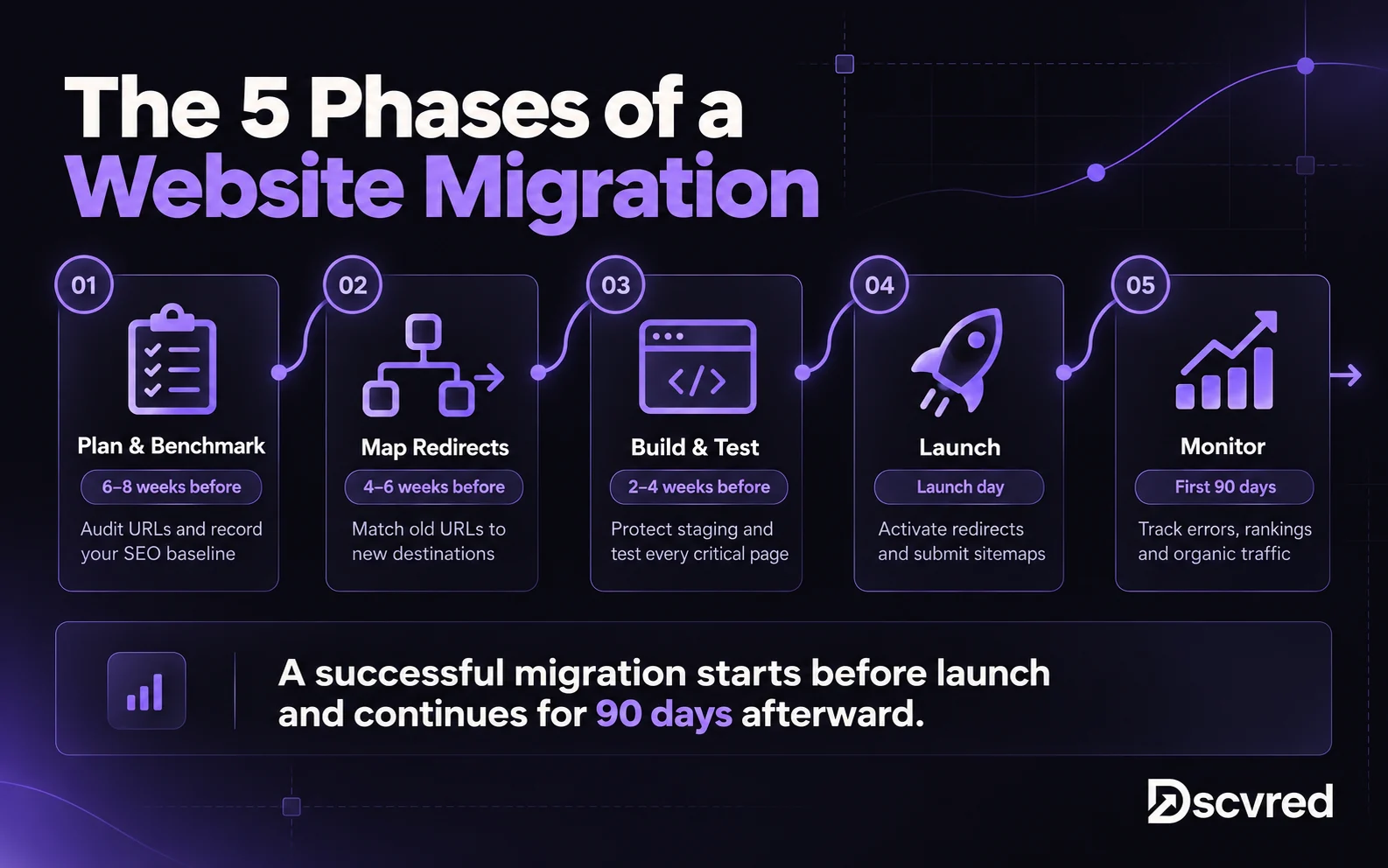
A website migration checklist is the list of tasks that protect your rankings when you change your domain, platform, URL structure or hosting. It covers five phases: plan and benchmark, map redirects, test on staging, launch, then monitor for 90 days. Skip a phase and you risk broken links, lost pages and a traffic drop that can take months to recover.
At Dscvred Studio, we're a Certified Webflow Partner, and platform migrations are part of most of our builds. This checklist has the 35 steps we run, with an owner and timing for each phase.
What Is a Website Migration?
A website migration is any major change to how your site is set up that can change how search engines find and rank it. The risk depends on whether your URLs change.
Steps 11 to 16 and 32 only matter when URLs change. A hosting-only move can skip them. A platform change usually changes URL patterns too, which is why our WordPress to Webflow migration guide spends a full step on the URL map.
Website Migration Checklist at a Glance
Plan for 4 to 8 weeks from the first audit to launch, then 90 days of monitoring. The timings below assume an 8-week plan.
Phase 1: Plan and Benchmark (6 to 8 Weeks Before Launch)
Planning protects you from the problems you can't fix after launch, like a missing baseline or a forgotten page.
Set the scope
1. Name the migration type using the table above. Google's site move guide advises changing one thing at a time. If you're changing domain, platform and design together, split them into stages where you can.
2. Set goals and success metrics, such as keeping organic clicks within an agreed range of today's level by day 90.
3. Back up the old site: files, database, media and any existing redirect rules.
Benchmark performance
4. Export 12 months of data from Google Search Console and GA4: pages, queries, clicks, sessions and conversions.
5. Record rankings for your most valuable keywords, so you can compare after launch.
Inventory every URL
6. Crawl the whole site with Screaming Frog or Sitebulb.
7. Add URLs the crawl misses: pull them from your XML sitemaps, analytics and the Links report in Search Console.
8. List your top pages by clicks, backlinks and conversions. These get the most care in every later phase.
9. Decide what happens to each URL: keep, merge, redirect or remove.
10. List every form, script and integration, such as HubSpot forms, GA4, Google Tag Manager and chat widgets.
Phase 2: Build Your 301 Redirect Map (4 to 6 Weeks Before)
The redirect map is a spreadsheet with every old URL in one column and its new URL in the next. It decides how much of your search traffic survives the move.
Map every old URL
11. Keep URLs identical wherever you can. No redirect is safer than any redirect.
12. Map each changed URL to its closest new page, matching topic and intent.
13. Include images, PDFs and videos. Google notes these files can get search traffic and links too.
Follow Google's redirect rules
14. Use server-side 301 or 308 redirects.
15. Point each old URL straight to its final page.
16. Return a 404 or 410 for pages you remove on purpose.
Phase 3: Build and Test on Staging (2 to 4 Weeks Before)
Staging is a private copy of the new site where you fix problems before Google and your visitors see them.
Protect and rebuild SEO elements
17. Block staging from search with password protection or a noindex rule. Keep a list of everything you'll unblock at launch.
18. Carry over titles, meta descriptions and H1s for every page you keep.
19. Add a self-referencing canonical tag to each new URL, and update hreflang tags on multilingual sites.
20. Rebuild schema markup, such as Article, FAQ and Organization.
21. Update internal links to the new URLs, so they skip the redirects.
Test before you launch
22. Submit every form and check tracking: leads should reach your CRM and GA4 events should fire.
23. Crawl staging and compare it with your Phase 1 crawl. Look for missing pages, lost titles and broken links.
24. Write a rollback plan: keep the old site, its backup and your current DNS records ready to switch back.
Launch only when steps 17 to 24 pass. If your top pages are missing content, titles or redirects, move the date.
Phase 4: Launch Day Checklist
Launch when your traffic is lowest. Google suggests timing the move to a seasonal or weekly dip.
25. Lower your DNS TTL a day or two ahead, so the change spreads faster. Many teams use 300 seconds.
26. Freeze content on the old site, so no edits get lost in the move.
27. Go live and switch on the redirects.
28. Remove noindex rules and robots.txt blocks used during the build.
29. Check SSL on every version of the domain, with and without www.
30. Test a sample of redirects, starting with your top pages from step 8.
31. Submit the new XML sitemap in Google Search Console and Bing Webmaster Tools.
32. Submit a Change of Address in Search Console, for domain or subdomain moves only.
On Webflow, redirects live in your site settings and can be added one at a time, in bulk by CSV or with wildcard rules. A CSV import replaces your existing redirects, so export the current list first, as Webflow's redirect import guide warns.
Phase 5: Post-Migration Monitoring (First 90 Days)
Monitoring catches the errors that only show up once Google recrawls the site.
33. Fix new 404s and crawl errors from the Search Console Pages report every week.
34. Update external links: ask your highest-value referring sites to link to the new URLs, and update social profiles and ad campaigns.
35. Compare traffic with your baseline at 30, 60 and 90 days.
How long does SEO recovery take?
For a small or medium site that keeps its domain, Google says most pages can take a few weeks to move in search, and larger sites take longer. Rankings can fluctuate while Google recrawls.
Domain changes are slower. A Search Engine Journal study of 892 domain migrations found traffic took 523 days on average to match the old domain. After 1,000 days, 17% still hadn't recovered. Change domains only when the business needs it.
From our Webflow builds
On platform moves, we launch with the same URLs, titles and copy, then redesign or rewrite in stages after launch. It adds little to a typical Webflow website timeline, and if traffic shifts, you know which change caused it.
Website Migration Tools
You can run most of this checklist with free tools and a spreadsheet.
How Dscvred Studio Can Help With Your Website Migration
We plan and run platform migrations to Webflow from WordPress, Wix, Squarespace and custom sites. That includes the URL inventory, redirect map, content import, staging QA and post-launch monitoring. If you're also changing the design, run website redesign SEO checks on your top pages too.
Planning a migration? Book an intro call and we’ll map your URLs, redirects and timeline before any work starts.
FAQ
What is a website migration?
A website migration is a major change to your site's domain, platform, URL structure, protocol or hosting. Any change that alters URLs needs redirects to keep your rankings.
How long does a website migration take?
Most marketing sites take 4 to 8 weeks from the first audit to launch, then 90 days of monitoring. Large sites and domain changes take longer.
How do you migrate a website without losing SEO?
Keep URLs the same wherever you can, 301 redirect every URL that changes, and carry over all titles, meta descriptions and content. Test on staging, then watch Search Console for 90 days.
Do I need Google's Change of Address tool?
Only for domain or subdomain moves. You don't need it for HTTP to HTTPS moves, www to non-www switches or URL changes on the same domain.
Should I redesign and migrate at the same time?
Google advises against it. Change one thing at a time, so you can tell which change affected your rankings.