

What Is Webflow? A Comprehensive Guide
Key Takeaways+
- Webflow is a visual development platform with a Designer, CMS, Editor, hosting and AI in one place.
- It writes real HTML, CSS and JavaScript, so it gives more control than drag-and-drop builders.
- For marketing teams, the biggest benefits come from reusable components, structured content and streamlined publishing workflows.
- Site plans start free. Basic costs $15/mo and Premium costs $25/mo, billed yearly.
- Webflow holds SOC 2 Type II and ISO 27001, but it isn't HIPAA compliant by default.
- WordPress runs 39.6% of all websites and Webflow runs 0.8% (W3Techs, October 2026).
Webflow is a visual web development platform for building, hosting and managing websites without writing code by hand. You style pages on a visual canvas, and Webflow generates clean HTML, CSS and JavaScript. It also includes a CMS, a content editor, managed hosting and built-in AI tools.
For marketing teams, that means launching landing pages and updating content without waiting on a developer.
At Dscvred Studio, we're a Certified Webflow Partner with experience building 50+ websites for B2B SaaS, technology, finance, and healthcare businesses. This guide explains how Webflow works, when it makes sense for marketing teams, what it costs, and when it's worth considering for your next website project.
What Is Webflow?
Webflow is a SaaS tool that puts web design, a CMS and hosting in one place. Designers build on a canvas, marketers edit content, and Webflow serves the finished site. In practice, this means marketing teams can update content without rebuilding every page.
Key facts:
| Fact | Detail |
|---|---|
| Founded | 2013, by Vlad and Sergie Magdalin |
| Users | 300,000+ organizations (Webflow About) |
| Category | Visual development platform with CMS and hosting |
| Positioning | "Website Experience Platform" from 2024; "agentic web platform" in 2026 |
| Code output | Clean HTML, CSS and JavaScript |
Webflow called itself a Website Experience Platform in October 2024, when it added Analyze and Optimize. In 2026, Webflow describes itself as "the agentic web platform for modern businesses."
How Webflow differs from drag-and-drop builders
Webflow follows the same rules as hand-coded sites. Tools like Wix and Squarespace place blocks on a page. Webflow uses the CSS box model, Flexbox and Grid, so designers control layout the way a developer would. The result is a fully custom site built around your brand.
How Webflow Works
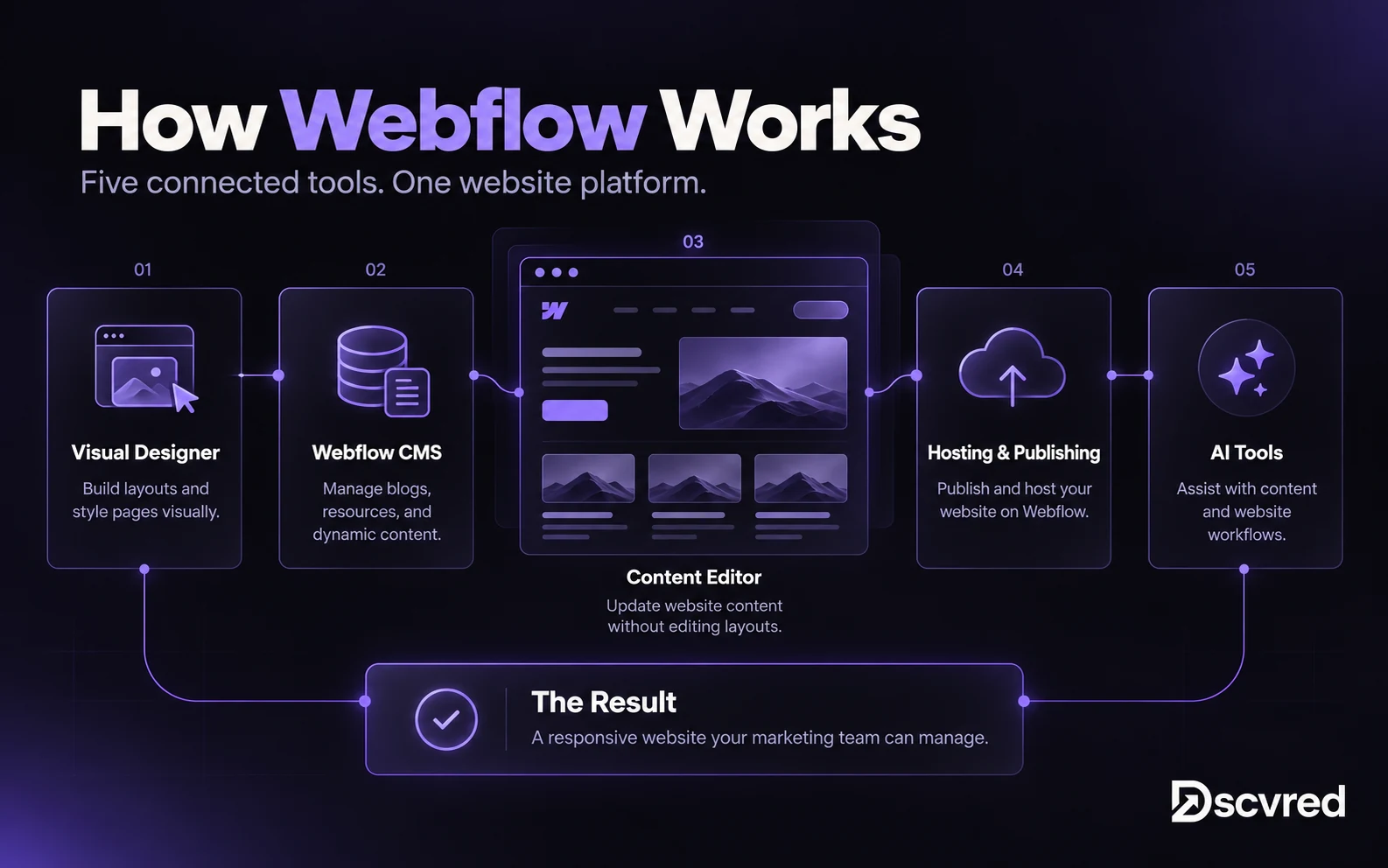
Webflow works through five connected parts: the Designer, the CMS, the Editor, hosting and AI tools. Each part serves a different person on your team.
| Part | What it does | Who uses it |
|---|---|---|
| Designer | Visual canvas for layout, styles, components and interactions | Designers and developers |
| CMS | Database of Collections, such as blog posts or team bios | Content and marketing leads |
| Editor | Edits text, images and CMS items without touching design | Marketers and content editors |
| Hosting | AWS infrastructure, Cloudflare CDN, SSL on every site plan | Managed by Webflow |
| AI and add-ons | AI site builder, Analyze, Optimize, Localize | Whole team |
The Designer
The Designer is where pages get built. You place elements, style them with classes and save reusable components. Webflow turns that work into live code. You add motion with its interactions panel.
The CMS and the Editor
The CMS stores repeatable content in Collections, and one template page displays every item. The Editor lets marketers update that content. They can only change what the designer allows, so the layout stays safe. Our guide to how Webflow CMS Collections work explains the structure in detail.
Webflow AI and Marketing Tools
Webflow AI is the set of AI features built into the platform. Webflow's CMS page lists an AI site builder, copy writing, SEO and AEO tips, and AI-made CMS items. Paid add-ons extend it:
- Analyze for site analytics, from $9/mo
- Optimize for AI-powered A/B testing and personalization, from $299/mo
- Localize for translated sites, from $9/mo
What Webflow Is Used For
Webflow is used for marketing websites that need strong design and frequent updates. Typical builds include company sites, landing pages, blogs, case study libraries and sites in more than one language.
Who Uses Webflow
- Designers and agencies build custom, pixel-accurate sites without waiting on a developer.
- Marketing teams edit copy, launch landing pages and run tests without engineering tickets.
- Startups and B2B brands launch fast marketing sites that rank and scale.
When Webflow isn't the right fit
Webflow is the wrong choice for:
- Logged-in customer portals or web apps
- Native forms that collect patient health data
- Large ecommerce catalogs with complex inventory rules
- Teams that need full server-side control of hosting
Why Marketing Teams Choose Webflow
For many growing B2B companies, the website becomes harder to manage as marketing activity increases. Publishing a landing page might require a developer, updating layouts might create inconsistencies, and simple website changes can get stuck in an engineering backlog.
Webflow can reduce this friction when the website is built with reusable components, structured content, and appropriate editing permissions.
- Faster campaign launches: reuse tested sections instead of rebuilding every landing page from scratch.
- Less dependence on developers: marketing teams can make routine content and CMS updates themselves.
- Consistent design: reusable components and shared styles reduce inconsistencies across pages.
- Easier content management: CMS Collections support repeatable articles, resources, case studies and team profiles.
These benefits are not automatic. A poorly structured Webflow website can still be frustrating for marketers. Component architecture, CMS planning and editor training matter just as much as the choice of platform.
How Marketing Teams Use Webflow
Marketing teams use Webflow by splitting responsibilities. Designers create reusable page sections, while marketers update content and create pages within the permissions and components made available to them. The following is an example team workflow, not a list of guaranteed native Webflow roles or approval features.
| Role | Typical owner | Main job |
|---|---|---|
| Designer | Agency or in-house designer | Builds components and styles |
| Marketer | Campaign manager | Builds pages from existing components |
| Content editor | Writer | Edits text, images and CMS items |
| Reviewer | Compliance or legal | Checks pages before publishing |
Case study: from one week to same day
PackageX, a logistics technology company, had a Webflow website its marketers could not easily manage independently. Launching a new page required engineering involvement and could take approximately a week. Dscvred Studio rebuilt the site with reusable sections and a more structured CMS, and moved paid landing pages from Unbounce into Webflow. The aim was to reduce technical dependencies and help the marketing team publish updates more efficiently. The results reported in the PackageX case study are summarized below.
| Metric | Before | After |
|---|---|---|
| Time to publish a new page | About 1 week | Same day |
| Pages live in the first 3 weeks | n/a | 28 |
| Paid leads per month | 60 | 105 (+75% within 2 months) |
See the implementation and results in the PackageX case study. For more examples, browse our projects.
Webflow Pricing and Plans
Is Webflow free? It has free and paid plans. The Starter plan is free, but a live business site needs a paid site plan. In May 2026, Webflow merged its old CMS and Business plans into one Premium plan.
| Plan | Price (billed yearly) | CMS items | Best for |
|---|---|---|---|
| Starter | Free | 50 | Learning and testing, no custom domain |
| Basic | $15/mo | None | Simple sites with no blog |
| Premium | $25/mo | 20,000 | Most marketing sites with a CMS |
| Team | $2,500/mo (annual contract) | 20,000 | Larger teams needing page branching |
| Enterprise | Custom | Custom | SSO, uptime SLA, scale |
Workspace costs can be separate from site plans. Prices and entitlements change, so confirm current options on Webflow’s official pricing page before budgeting. Design and implementation often cost more than the platform subscription itself.
Webflow vs WordPress for Marketing Teams
Webflow can be easier for marketing teams that want visual design control and managed hosting without managing many site plugins. WordPress can be just as editor-friendly when configured well, and may be preferable if you need its extensive plugin ecosystem or server-side flexibility. The best fit depends on how your organization builds, publishes and maintains content.
| Factor | Webflow | WordPress |
|---|---|---|
| Hosting | Included and managed | You choose and manage it |
| Plugins | Rarely needed | Most sites rely on several |
| Security updates | Handled by Webflow | Your team or agency |
| Design control | Visual, with real CSS | Depends on theme and builder |
| Marketer editing | Editor with locked layouts | Varies by setup |
For teams weighing a rebuild, consider editor access, integrations, migration complexity and who will maintain the website after launch.
When to Consider Migrating to Webflow
Webflow can be a strong fit for organizations that need faster content updates and more control over a marketing website. But a migration is not always the right decision. Evaluate how well your current website supports your team before choosing a replacement platform.
| Question to ask | Why it matters |
|---|---|
| Does your team need developers for routine page updates? | Reusable components and editor-friendly workflows may reduce that dependency. |
| Do you launch landing pages frequently? | A component-based system can help campaigns launch more consistently. |
| Is your current CMS difficult to maintain? | A well-planned CMS can simplify repeatable content and relationships. |
| Do you depend on server-side features or specialized plugins? | These requirements can change the platform recommendation or require integrations. |
| Can URLs, content and tracking be preserved? | Migration needs redirects, content mapping, analytics checks and SEO QA. |
The goal is to fix the workflow, not simply switch technology. If your current site already supports the team well, a migration may offer limited value. If it prevents timely launches and content updates, a Webflow rebuild may be worth exploring.
For an implementation assessment, see Dscvred Studio Webflow development and migration.
The Webflow Learning Curve
Webflow is easy to edit and harder to design in. Marketers can update content in the Editor with little training. The Designer takes longer to learn, because it follows CSS rules like margins, Flexbox and classes.
Webflow University offers free video courses for both. Many teams skip that step. A partner builds the system, then trains marketers to run it.
Webflow Security for Regulated Businesses
Webflow may be suitable for marketing websites in regulated industries, but platform certifications do not by themselves establish that a specific implementation satisfies an organization’s legal or compliance requirements. Webflow’s published security materials describe its controls and certifications, including SOC 2 Type II and ISO standards.
Three limits matter for regulated teams:
- Single sign-on (SSO/SCIM) is Enterprise-only.
- The 99.99% uptime SLA covers Enterprise customers only, per Webflow hosting.
- HIPAA: Webflow states it isn't HIPAA compliant by default.
| Industry | Fine on Webflow | Needs a separate compliant tool |
|---|---|---|
| Fintech and financial services | Marketing site, disclosures, insights | Account logins, client financial data |
| Healthcare | Service pages, provider bios, education | Forms that collect patient health data |
| Law firms | Practice areas, attorney bios, articles | Confidential client intake |
These examples describe common website implementation patterns, not legal or compliance advice. Review data collection, vendor contracts, access controls and required approvals with your compliance team before launch.
See how we build for financial services firms and healthcare teams.
Build a Website Your Marketing Team Can Manage
Your website shouldn't slow down campaign launches, content updates or marketing experiments. Dscvred Studio designs, builds and migrates Webflow websites for growing businesses, with reusable components, structured CMS Collections and publishing workflows that reduce unnecessary developer involvement.
Explore Dscvred Studio Webflow development services, or book a discovery call to discuss your website.
FAQ
Is Webflow open source?
No. Webflow is a proprietary hosted platform. You build and host sites on Webflow's infrastructure, and you can't self-host the platform itself.
What is Webflow CMS?
Webflow CMS stores repeatable content in Collections. One template can render a page for each item. Our guide to Webflow CMS covers Collections in more detail.
Is Webflow good for SEO and AI search?
Yes. Webflow gives you control of meta tags, URLs, redirects, sitemaps and alt text, and it outputs clean code. It also offers AI-generated SEO and AEO suggestions. Rankings still depend on your content. Our SEO and AEO services cover that side.
Is Webflow HIPAA compliant?
No, not by default. Webflow says its platform isn't designed for protected health information. Healthcare teams should collect patient data through a HIPAA-compliant form tool.
Do You Need a Developer to Manage a Webflow Website?
Not for every task. Once a Webflow website is properly structured, authorized marketers can update content and CMS items and build pages using the tools and components available to their role. Building new components, custom integrations or complex interactions may still require a developer. A good implementation minimizes that dependency for routine work.